
Apply for COC and ASCC
IMPORTANT:
- In order to apply for a Certificate of Clearance (COC) or Activity Supervisor Clearance Certificate (ASCC), you must submit an online application.
- For information on how to complete applications for new teaching credentials submitted by a Commission-approved program sponsor, please visit the Complete Your Recommendation page.
The COC is not related to obtaining a clear credential. The COC provides no authorization to provide instruction or services in schools; its sole purpose is to provide verification that the holder has completed a professional fitness review.
Like the COC, the ASCC identifies that the holder has completed the Commission’s fingerprint character and identification process and provides no authorization to provide instruction or services in schools.
- See Credential Leaflet CL-900 for more information on the Certificate of Clearance (COC).
- See Credential Leaflet CL-891 for more information on the Activity Supervisor Clearance Certificate (ASCC).
Fingerprint Clearance
California residents or non-residents who are able to travel to California must complete section 3 of the form 41-LS and print it out. Take the completed form into a live scan location, where you will pay a fee at the time of service and be scanned. Do not email your form to the Commission, the scans are sent directly to the CTC.
You can find a list of Live Scan locations in the State of California on the official state website.
If you are unable to complete the Live Scan process, please see Fees and Fingerprinting for more details.
Applying for COC and/or ASCC
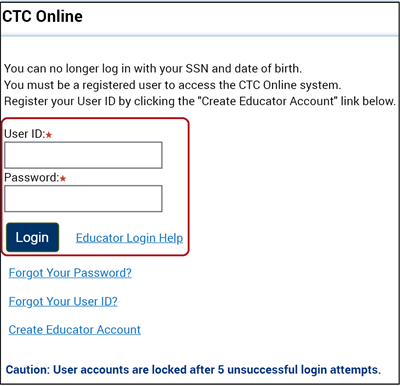
Apply for your document using CTC Online. If you do not have an account, please Create an Educator Account.
- Login to your CTC Online Account.
Continue to the Educator Documents page, which will display after the Legal Disclaimer and Personal Information pages.
- Scroll to the bottom of the Educator Documents page and click the Complete a Certificate of Clearance or ASCC Application button.

- Select Create New to start the application.

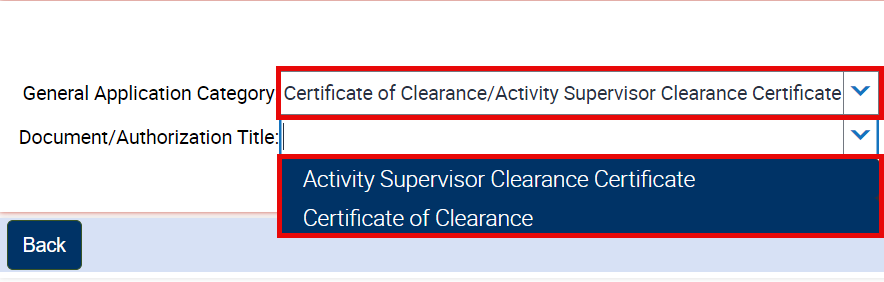
- Select Category and Document/Authorization.
General Application Category:
- Certificate of Clearance/Activity Supervisor Clearance Certificate
Document/Authorization Title, select either:
-
- Certificate of Clearance or
- Activity Supervisor Clearance Certificate
Click Next.
- Finally, complete the Professional Fitness Questions (PFQs) and submit your payment to complete the online application.
NOTE:
Once the application and payment have been completed, the document will no longer display under the Apply For A COC or ASCC section.
For information on how to check the status of your application, please refer to the Check Application Status page.

Commission on Teacher Credentialing
651 Bannon Street
Sacramento, CA 95811